dumb thing no. 1
 ContextWire
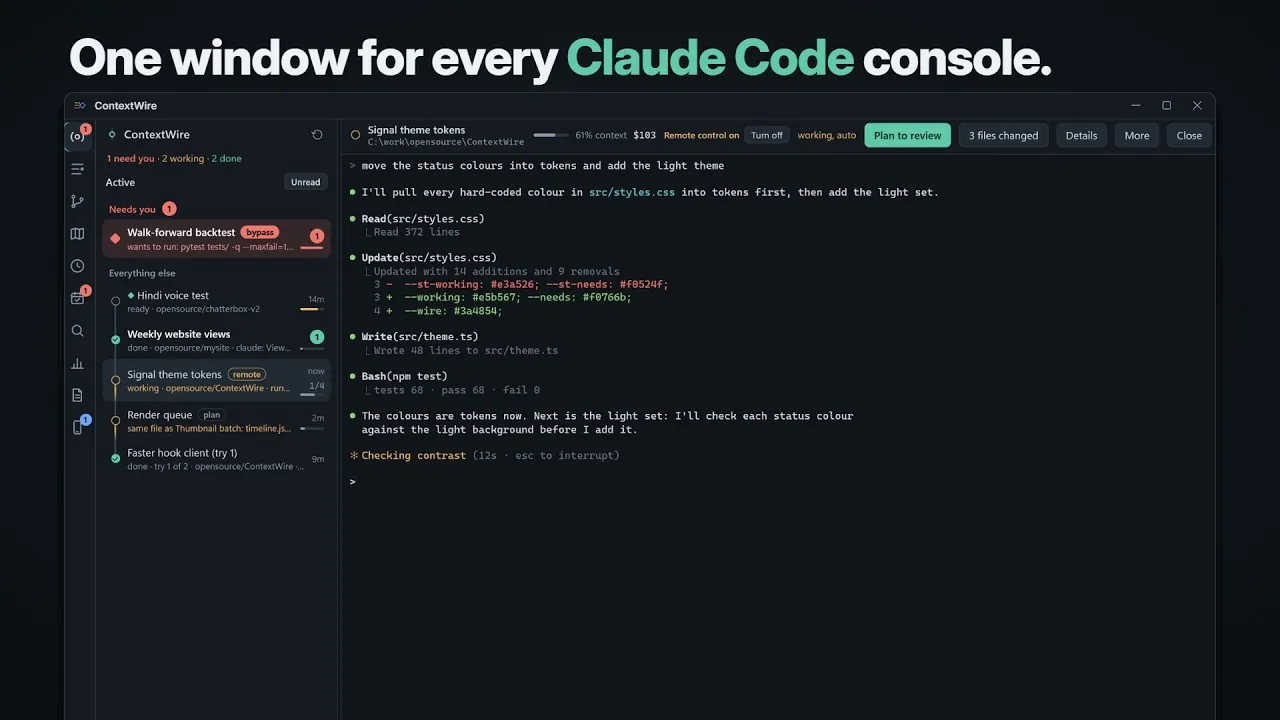
One window for every Claude Code console.
Every Claude Code session you have running, in one place. It tells you which one is
waiting for you, shows what each prompt changed, and lets you answer from your phone.
Each chat is the real claude CLI, so nothing you know stops working.
Windows 10 and 11. macOS and Linux: coming soon.
30 days free on each computer, then $20 a seat.
We had eleven terminals open.
We could not tell which Claude was waiting for us. A sensible person would have closed a few. We built an app.
Run Claude Code in a few repos at once and this is your afternoon: clicking through windows to find the one that finished, the one stuck on a permission prompt, and wherever yesterday’s session lived.
Or watch us explain it.
 Play the video: We had eleven terminal windows open. So we built ContextWire for Claude Code
It plays from YouTube when you press it. Until then nothing on this page comes from YouTube.
It tells you who needs you.
You stop checking. A session waiting on a permission prompt turns red, moves to the top and says what it wants. One that finished in the background turns bold with a badge.
ContextWire
- Needs you A permission, an answer or a plan to review. It says which.
- Working Leave it alone. Go look at another one.
- Done Finished while you were elsewhere, with an unread badge.
-
Every chat is a real claude console
Slash commands, permission prompts, skills, your settings and
CLAUDE.mdwork exactly as they do in a terminal. -
A queue of who is waiting
Sessions that need you come first, each with its reason: “wants to run: …”, “has a plan for you to review”.
-
It taps you on the shoulder
A Windows toast and a taskbar flash. Click the toast and you’re in that session.
-
Shape as well as colour
Every status has its own shape, so the list reads at a glance and without relying on red and green.
Yesterday’s session is one click away.
No more hunting for the folder and typing claude --resume.
- Earlier sessions under every workspace, newest first. Click one and it resumes in the right folder.
- Back after a restart. The sessions you had open come back when the app does.
- Templates. Save a folder, prompt, mode and model, and start it again from the Run button.
- Parallel tries. One prompt in two to four git worktrees, compared side by side, with Claude as judge.
See what Claude actually did.
“It changed some files” is not a status report.
- A diff per prompt. Revert one file, or the whole turn.
- Local history. A snapshot of your files before every prompt, kept apart from git. It brings back even a file that was never committed.
- Tasks and subagents in a drawer, next to the files and commands of the current turn.
- Two sessions, one file? You get a warning. Same when a turn makes too many tool calls or costs too much.
- What it costs. A context gauge on every session, cost per session, and a daily budget alert.
The code, in the same window.
Press Ctrl+Shift+O, or Code in a session’s header, and the repository
opens as a tree, the way an IDE shows a project. Read-only, with your own editor one
click away.
-
The whole tree
Folders fold, changed and new files are in colour, files open as tabs with line numbers and syntax colours.
-
Find a file, find a word
Ctrl+Pfinds a file by a few letters of its name.Ctrl+Shift+Fsearches every file, and a hit opens at its line. -
Git beside the code
Changed lines are marked next to the line numbers. Annotate shows who changed each line and when; History and Diff open its commits.
-
It follows Claude
The open file updates itself when Claude writes it, and files a session touched lately carry a dot.
-
Shells it left running
The dev server or watcher Claude started in the background shows under its session. Click one for its output as it grows; Stop ends it, and Claude is told.
Git that knows which session wrote it.
Three agents edited the repo this morning. The commit window sorts the changes by the session that made them, so each one goes in as its own commit.
-
Which session wrote this line?
A commit names the session and prompt behind it. Click a line number in a diff and it does the same for that line.
-
Every repository at a glance
What is to push, to pull and uncommitted, for every repository under your workspaces. Commit, or commit and push, right there.
-
The awkward parts too
Shelves, a three-pane merge conflict resolver, and editing the message of a commit you haven’t pushed yet.
-
A second pair of eyes
Claude reviews what is new in a repository, on a click or on a schedule.
The docs, and the chores.
The things you alt-tab away for, brought into the same window.
- Docs panel. The Markdown files of every repository your sessions work in: READMEs, notes, plans, skills. Rendered properly, with search.
- It follows Claude. When a turn changes a file you have open, you see the new text.
- Roadmaps. Every project that keeps a
roadmap.yaml, folded to its name and a progress bar. Unfold one for what is in progress, what is next and what waits on you. - Scheduled agent jobs. Set a task up once. Claude runs it unattended on a schedule and reports back.
- Find Action. Run any command by name, and change any shortcut you don’t like.
- Compose. A proper text box for long messages, quoting what Claude said, and Windows voice typing.
Answer it from the sofa.
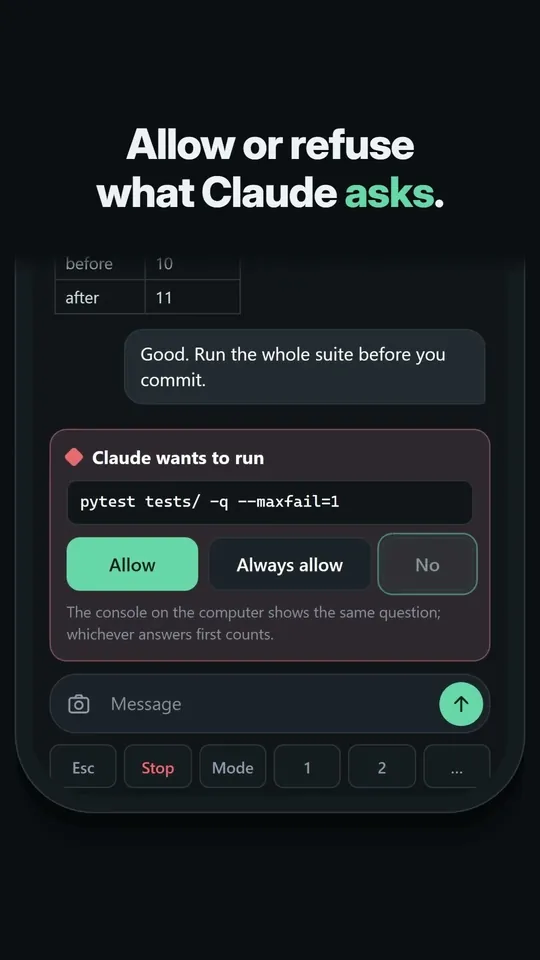
Pair a phone and it shows the sessions on your computer. Read the conversation, allow or refuse what Claude asks, send a message. The phone talks to your computer only: there is no ContextWire server and no account.
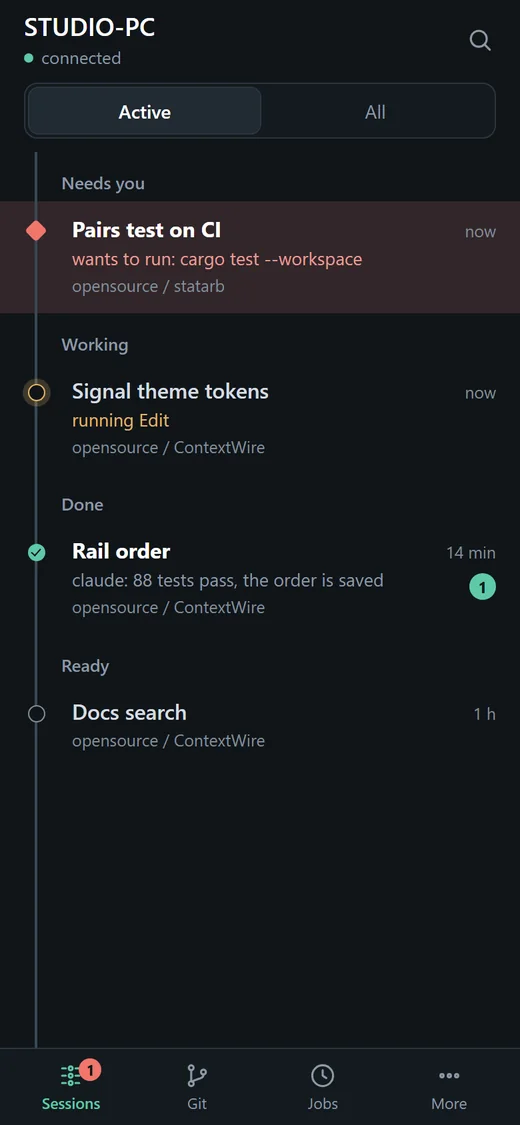
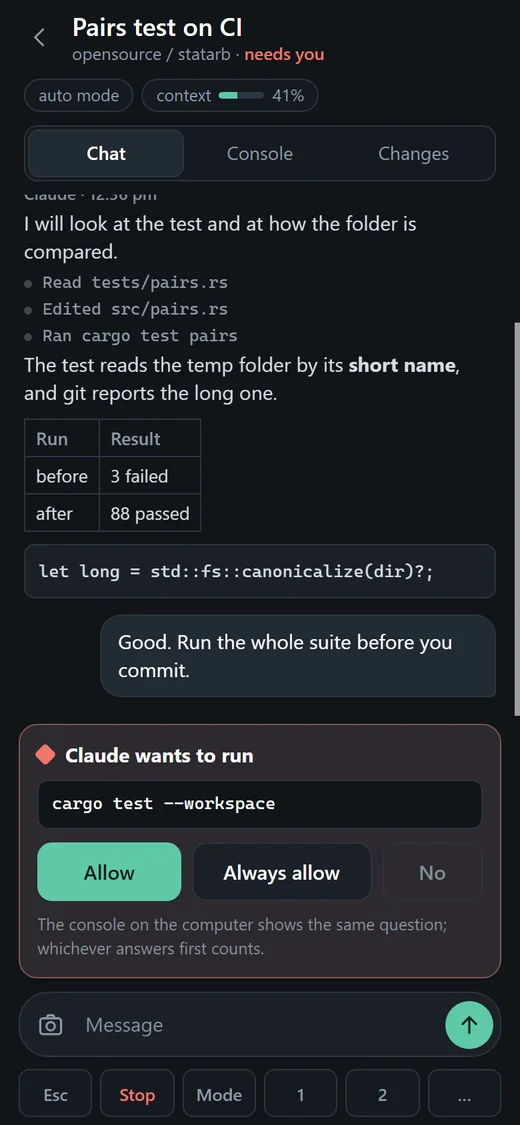
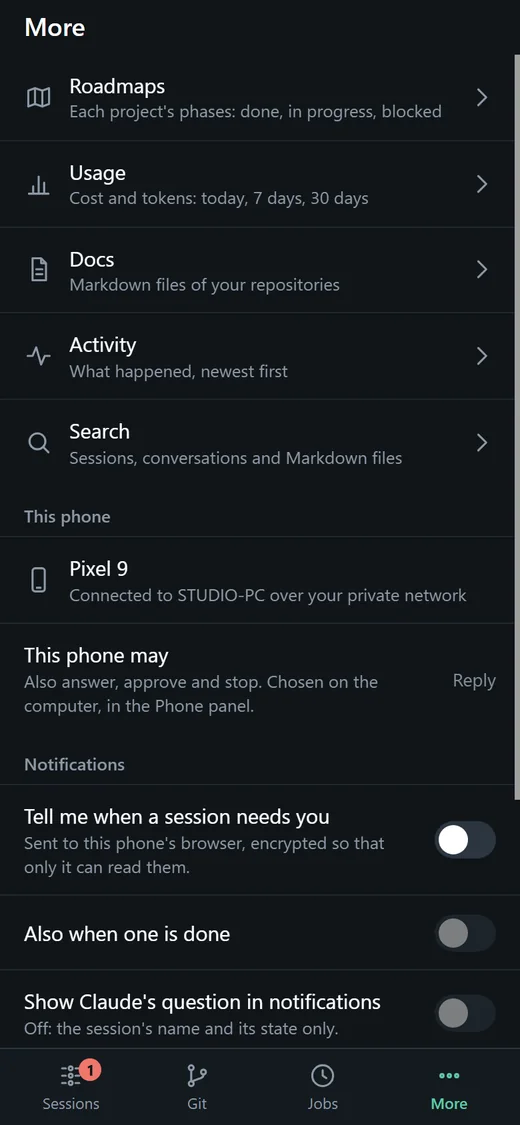
 Play the video: Answer Claude Code from your phone
see it move. Allowing a command from the sofa, in under a minute. It plays from YouTube when you press it.
-
Whoever answers first wins
The console on the computer shows the same prompt as the phone. Answer on either.
-
You choose how much a phone may do
View only reads. Reply also answers and sends messages. Full can start sessions, commit and push.
-
Nothing opened to the internet
It runs over Tailscale, a private network between your own devices, which is free for personal use. Phone access is off until you switch it on.
-
A nudge when it matters
A notification when a session needs you. It carries the session’s name and state, and the conversation only if you say so.
Hands stay on the keyboard.
Plain Ctrl keys are left to Claude. Every one of these can be changed.
- Shift Shift
- Search everywhere
- CtrlShiftU
- Jump to the session that needs you
- CtrlShiftN
- New session
- CtrlShiftH
- Resume a past session
- CtrlShiftK
- Commit window
- CtrlShiftY
- Local history
- CtrlShiftA
- Run any command by name
- Ctrl1 to 9
- Open the Nth active session
What stays on your machine
- Your sessions. The
claudeCLI talks to Anthropic exactly as it does in a terminal. ContextWire adds nothing to that. - One request of its own: a check for a newer version, which carries nothing about you or your sessions.
- Logs record events, folders and tool names. Never prompts, never conversation text.
- Your Claude settings are left alone unless you ask it to track sessions started in plain terminals, and then it keeps a backup.
What it won’t do
- Make your agents smarter. It only tells you which one has been waiting for you since lunch.
- Mirror a terminal. A session lives in one console at a time. It replaces your terminal windows; “Adopt here” moves a session in.
- Run on a Mac or Linux. Windows only, for now.
- Stop being a window for managing your other windows. We are aware.
“Doesn’t the official Claude desktop app do this?” It also runs sessions side by side, in its own chat interface, and it cannot attach to a session running in a terminal. ContextWire keeps the real CLI as the console and reads status through Claude Code’s hooks.
Get it.
You’ll need the Claude Code CLI installed. ContextWire runs it; it doesn’t replace it.
30 days free on each computer, no card, no sign-up. After that, a licence: $20 a seat (₹1,699 in India, GST included), with a year of updates. Buy a licence. No refunds, so use the 30 days first; the licence terms say the rest.
Windows
Windows 10 and 11, 64-bit. Installs for you alone, no admin rights.
Download for Windowscoming soon
Windows will make a fuss first: rehearse it below. To check you
got ours, its SHA-256 is .
macOS
coming soon
Linux
coming soon
Then Windows pretends it saved your life.
We haven’t bought a code-signing certificate yet, so Windows files us under “unknown publisher”. Fair: you’ve never heard of us. Run the installer and you get a big blue box about how it protected your PC. Practise here first.
Your browser may also sulk that the file “isn’t commonly downloaded”; choose Keep. Only do any of this for the file from the button on this page.
Windows protected your PC
Microsoft Defender SmartScreen prevented an unrecognized app from starting. Running this app might put your PC at risk.
App: ContextWire-setup.exe
Publisher: Unknown publisher
the way out is the tiny “More info” link. it’s that small on purpose.
Want it?
The download is on its way to this page. Take a tab so we know you’re waiting, or leave an email and we’ll write once, the day it’s here.
On a Mac or on Linux? Those are coming. Take a tab so we know you’re waiting, or leave an email and we’ll write once, the day yours is here.
You’ll need Windows 10 or 11 and the Claude Code CLI. ContextWire runs it; it doesn’t replace it.
counting…
ContextWire is an independent project and is not affiliated with Anthropic. The pictures on this page show sample sessions.